Cleaner Message Templates for Airbnb Turnover Coordination

TurnoverPing Team
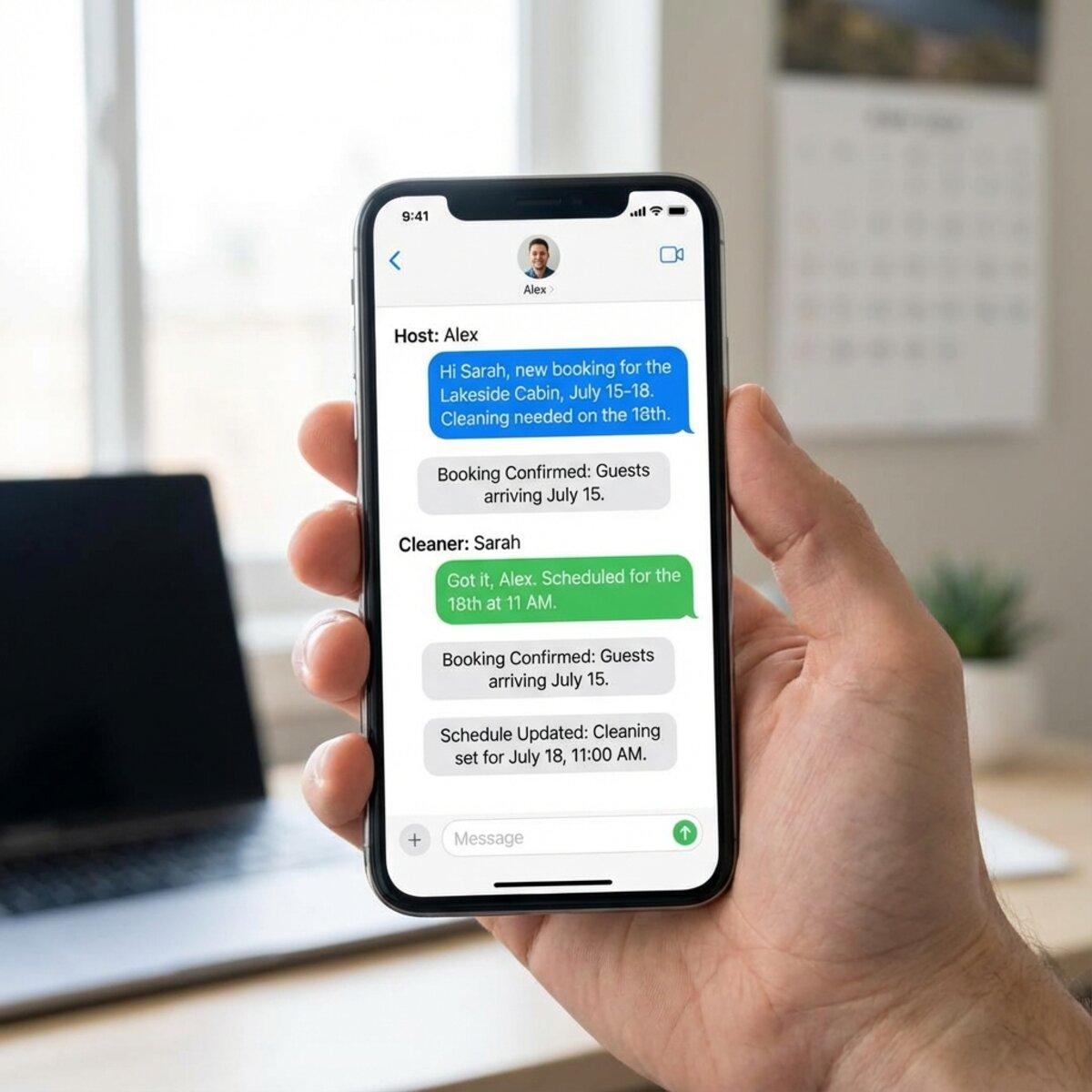
You just got a new booking. Now you need to tell your cleaner. But what exactly do you say? How much detail is enough? What about when bookings change?
Writing the same messages over and over wastes time. Missing crucial details leads to confusion, missed turnovers, and frustrated cleaners. The solution is a set of tested message templates you can copy, paste, and customize in seconds.
These templates cover every common scenario: new bookings, cleaning reminders, special instructions, issue reports, post-cleaning check-ins, and appreciation messages. Use them exactly as written or adapt them to your style.
Key Takeaways
- ✅ Consistent messaging reduces miscommunication and missed turnovers
- ✅ Clear new booking notifications include property, dates, guest count, and checkout time
- ✅ Reminders sent 1-2 days before checkout prevent scheduling conflicts
- ✅ Special instruction templates handle guest requests and supply needs
- ✅ Post-cleaning check-ins catch issues before guests arrive
Automate Your Cleaner Messages
TurnoverPing sends these messages automatically when bookings sync from your calendar. Zero copy-pasting required.
Why Cleaner Communication Matters
Good cleaner communication directly affects your reviews. When cleaners know exactly what's expected, they deliver consistent results. When messages are vague or missing, things get missed.
The Cost of Poor Communication
A cleaner who shows up at the wrong time delays your next guest's check-in. A cleaner who doesn't know about a late checkout walks into an occupied unit. A cleaner who wasn't told about a special request disappoints a guest celebrating an anniversary.
Each miscommunication creates stress for you, your cleaner, and your guests. Reviews suffer. Relationships strain. You spend hours fixing problems that clear messaging would have prevented.
What Great Communication Looks Like
Effective cleaner communication is:
- Timely enough to give cleaners adequate notice
- Complete with all relevant details in one message
- Consistent so cleaners know what to expect
- Respectful of your cleaner's time and professionalism
Templates solve the consistency problem. Once you have a template that works, every message includes the right information in the right format.
According to Airbnb hosting best practices, clear and prompt communication with your team is essential for maintaining five-star cleanliness ratings. Choose channels your cleaners actually check, whether that's SMS, WhatsApp, or email.
New Booking Notification Template
This is the most important message you send. It tells your cleaner that work is coming and gives them all the details they need to prepare.
The Template
Hi [Cleaner Name],
We have a new booking at [Property Name].
Check-out: [Date] at [Time] Check-in: [Date] at [Time] Guests: [Number]
Please confirm you're available for the turnover cleaning on [Cleaning Date].
Thanks!
Why This Works
The template opens with the property name so cleaners managing multiple properties immediately know which one you're discussing. Checkout and check-in times establish the cleaning window. Guest count helps cleaners estimate workload.
The confirmation request is crucial. Without it, you're assuming availability instead of confirming it.
Send new booking notifications as soon as the booking is confirmed. The more lead time cleaners have, the easier it is for them to manage their schedule. For same-day turnovers, see our guide on handling same-day Airbnb turnovers.
Customization Tips
Add property-specific details when relevant:
- Gate codes or lockbox combinations
- Parking instructions
- Special cleaning focus areas for that property
Keep the core template, but append these details at the end.
Cleaning Reminder Template
Even confirmed cleaners benefit from a reminder 1-2 days before the cleaning. Life gets busy. Calendars get crowded. A quick reminder prevents no-shows.
The Template
Hi [Cleaner Name],
Just a reminder for the cleaning at [Property Name] on [Date].
Guest [Guest Name] checks out at [Time].
Please focus on [specific areas if needed] and let me know if you have any questions.
Thanks!
When to Send
Send reminders 24-48 hours before the scheduled cleaning. Earlier reminders may be forgotten. Same-day reminders don't give cleaners time to adjust if there's a conflict.
The reminder is also your chance to add any last-minute details, like a guest's special request or a recently reported maintenance issue.
Special Instructions Template
Some turnovers require extra attention. A guest celebrating a birthday. A property that just had new furniture delivered. A repair that affects cleaning access.
The Template
Hi [Cleaner Name],
For the cleaning on [Date] at [Property Name], please note:
- [Instruction 1]
- [Instruction 2]
- [Instruction 3]
If you have questions about any of these, let me know before you arrive.
Thanks for your attention to detail!
Common Special Instructions
Use this template for:
- Guest celebrations: Leave out a welcome note, arrange flowers, or set up a special display
- Supply restocking: Pick up specific items and include on expense report
- Maintenance awareness: A room is off-limits, a fixture is broken, or workers will be present
- Extended stay turnovers: Deep cleaning requirements after longer bookings
Create a Custom Cleaning Checklist
TurnoverChecklist.com generates property-specific checklists your cleaners can follow. Ensures nothing gets missed, even with special instructions.
Combining with Standard Checklists
Special instructions work best when paired with a standard checklist. Your cleaner follows the usual process, then handles the extra items. This is why having a solid turnover SOP matters for consistency.
Issue Reporting Template
Communication goes both ways. Cleaners often discover issues that need your attention: guest damage, maintenance problems, or supply shortages. Give them a template for reporting these clearly.
The Template (Cleaner to Host)
Hi [Host Name],
During today's cleaning at [Property Name], I found:
Issue: [Description] Location: [Where in the property] Severity: [Urgent/Can wait/FYI only]
[Photo attached if applicable]
Also, we're running low on [supply list if applicable].
Let me know how you'd like me to handle this.
Thanks, [Cleaner Name]
Training Your Cleaners to Report
Share this template with your cleaners during onboarding. Explain what qualifies as urgent (safety hazards, broken locks, major damage) versus what can wait (scuffed paint, minor wear).
Encourage cleaners to photograph issues as they find them. Timestamped photos protect you from false damage claims and help you track property condition over time. Learn more about photo documentation for turnovers.
Responding to Issue Reports
When cleaners report issues, respond promptly even if you can't immediately resolve the problem. A quick "Got it, I'll handle this" shows you take their reports seriously and encourages continued diligence.
Post-Cleaning Check-In Template
After the cleaning is complete, a brief check-in confirms everything went smoothly and catches any issues before the next guest arrives.
The Template
Hi [Cleaner Name],
Thanks for handling [Property Name] today.
Did everything go smoothly? Anything I should know about:
- Property condition
- Supply levels
- Maintenance concerns
Your feedback helps us keep everything running well.
Thanks again!
Why Check-Ins Matter
Check-ins create a feedback loop. Cleaners may notice patterns you miss: a shower drain that clogs repeatedly, linens that wear out faster than expected, or appliances that guests frequently misuse.
This information helps you maintain properties proactively instead of reacting to guest complaints.
Frequency of Check-Ins
For high-turnover properties, you may not need a check-in after every cleaning. Weekly summaries work for properties with multiple turnovers. For less frequent bookings, a check-in after each cleaning keeps you informed.
Appreciation Message Template
Reliable cleaners are invaluable. Let them know you notice their work.
The Template
Hi [Cleaner Name],
Just wanted to say thanks for the great job at [Property Name]. The guest left a [5-star review/positive comment] specifically mentioning how clean everything was.
Your attention to detail makes a real difference for our guests and our reviews.
Really appreciate you!
When to Send Appreciation
Send appreciation messages when:
- A guest mentions cleanliness in a review
- A cleaner handles a difficult turnover (short window, messy guests, special requests)
- You've been working with a cleaner consistently and haven't acknowledged their work recently
Recognition doesn't cost anything, but it builds loyalty. Cleaners who feel valued take more pride in their work and are less likely to leave for other opportunities.
Automating Your Messages
Templates save time, but sending them still requires remembering, copying, pasting, and customizing. At scale, even templated messaging becomes a burden.
Automation tools handle this entirely. When a booking syncs from your calendar:
- The system creates a cleaning job
- Your cleaner receives a notification with all relevant details
- Booking changes automatically update the message
- Cleaners confirm via simple reply
No templates to copy. No messages to forget. The information flows automatically from your booking platform to your cleaning team.
Managing bookings across Airbnb, VRBO, and Booking.com? RentalReportDaily.com sends you a daily digest of all reservations so you never miss a turnover that needs communication.
For hosts ready to move beyond templates, tools like TurnoverPing connect your booking calendars to automated cleaner notifications. Your cleaners get the right message at the right time without you lifting a finger.
Conclusion
Clear cleaner communication prevents missed turnovers, catches issues early, and builds stronger working relationships. These templates cover the essential scenarios:
- New booking notifications that include all cleaning details
- Reminders that prevent scheduling conflicts
- Special instructions for unique situations
- Issue reporting that keeps you informed
- Check-ins that create feedback loops
- Appreciation that retains great cleaners
Start with copy-paste templates. Customize them to match your properties and style. Then consider automation to eliminate the messaging overhead entirely.
Your cleaners and your guests will notice the difference.
Frequently Asked Questions
How far in advance should I notify my cleaner about a new booking?
What's the best way to send messages to cleaners?
Should I use the same template for every property?
How do I handle it when a cleaner doesn't respond to my message?
Can I automate cleaner messages instead of sending them manually?
Stop Sending Messages Manually
TurnoverPing automates cleaner notifications, confirmations, and reminders. Your booking calendar becomes the trigger. Your cleaners get notified instantly.
Related Articles
How to Organize Linen and Laundry for Multiple Properties
Master the art of linen inventory and laundry logistics across multiple vacation rentals. Learn the 3-set system, professional laundry strategies, and how to keep every property guest-ready without the chaos.

Airbnb Cleaning Checklist for Small Studios and Tiny Spaces
Master the art of cleaning compact vacation rentals. This checklist covers studio apartments, tiny homes, and small spaces where every minute and every square foot counts.

Best Practices for Sharing Calendar Access with Your Cleaners
Discover the safest, most effective ways to share your Airbnb, VRBO, and Booking.com calendars with your cleaning team. Stop micromanaging and start automating.