How to Automate Your Airbnb Cleaning Schedule (Step-by-Step Guide)

TurnoverPing Team
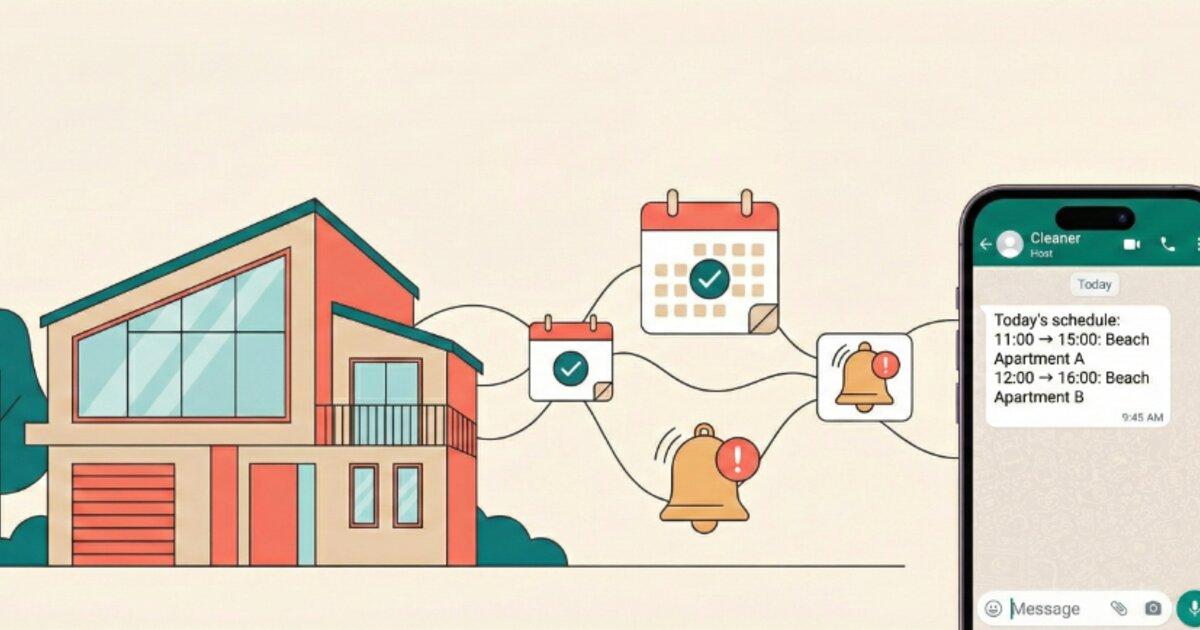
You just got back-to-back bookings. Great news for your wallet, but now you're scrambling to text your cleaner, confirm they're available, and pray nothing falls through the cracks.
Sound familiar?
Managing cleaning schedules manually is the hidden time sink that exhausts Airbnb hosts. Text messages get buried. Calendars fall out of sync. Cleaners miss turnovers. Guests walk into dirty units.
There's a better way. Airbnb cleaning automation eliminates the chaos by connecting your booking calendars directly to your cleaning team. No more manual coordination. No more missed cleans. No more stress.
This guide walks you through exactly how to automate your Airbnb cleaning schedule, step by step.
Key Takeaways
- ✅ Calendar sync automatically creates cleaning jobs from your bookings
- ✅ Instant cleaner notifications eliminate missed turnovers
- ✅ Backup cleaner logic handles declines without your intervention
- ✅ Automation scales effortlessly from 1 to 50+ properties
- ✅ You save 5+ hours per week on coordination tasks
Automate Your Cleaning Schedule Today
TurnoverPing syncs with your Airbnb calendar and notifies your cleaners automatically. Zero manual coordination required.
Why Manual Scheduling Fails
Before diving into automation, let's understand why the old way doesn't work.
The Text Message Trap
You send a message: "Hey, can you clean Unit 3 tomorrow at 11am?"
Your cleaner sees it 4 hours later. By then, you've already sent two follow-ups. They confirm, but the booking was modified. Now you need to send another message correcting the time.
This cycle repeats for every single turnover.
Calendar Chaos
You're juggling Airbnb, VRBO, and maybe Booking.com. Each platform has its own calendar. Keeping a master cleaning schedule synchronized across all of them is a part-time job in itself.
The Human Error Factor
Even the best cleaners forget. Even the most organized hosts miss things. When your system depends entirely on humans remembering to check calendars and send messages, turnovers will eventually be missed.
A single missed turnover can result in a refund request, a 1-star review, and damage to your Superhost status. According to Airbnb's hosting standards, cleanliness is among the top factors guests consider when leaving reviews.
The Scaling Problem
Managing 2-3 properties manually is stressful but survivable. Managing 10+ properties this way is unsustainable. Every new property multiplies your coordination workload.
What Cleaning Automation Actually Does
Think of cleaning automation as an invisible assistant that watches your booking calendars 24/7 and takes action the moment something changes.
Here's the core workflow:
Step 1: A booking comes in (or gets modified)
Your Airbnb, VRBO, or Booking.com calendar updates with a new reservation, a cancellation, or a date change.
Step 2: The system detects the change
Automation tools sync with your iCal feeds (the standard calendar format used by all major booking platforms) every 15-30 minutes. They detect new checkouts and create cleaning jobs automatically.
Step 3: Your cleaner gets notified instantly
The moment a cleaning job is created, your assigned cleaner receives a notification via SMS, WhatsApp, or email. No action required from you.
Step 4: Confirmation flows back automatically
Your cleaner replies with a simple "OK" or clicks an Accept button. The job is confirmed. If they decline, a backup cleaner is automatically notified.
Step 5: You stay informed without lifting a finger
You receive notifications when jobs are confirmed, declined, or completed. Full visibility, zero effort.
iCal is the universal calendar format. Every booking platform (Airbnb, VRBO, Booking.com) provides an iCal URL that automation tools can read. This is how they stay synchronized with your reservations in real time.
Step-by-Step Guide to Automating Your Cleaning Schedule
Ready to set up your own automated cleaning workflow? Here's exactly how to do it.
Step 1: Gather Your iCal URLs
First, export the iCal links from each booking platform you use.
For Airbnb:
- Go to your listing's Calendar tab
- Click "Availability Settings" (gear icon)
- Scroll to "Connect to another calendar"
- Copy the "Export Calendar" link
For VRBO:
- Navigate to your property calendar
- Look for "Calendar Sync" or "Export" (see VRBO's calendar sync guide)
- Copy the iCal URL provided
For Booking.com:
- Log into your Extranet
- Go to Property > Rates & Availability
- Find the iCal export option
- Copy the calendar URL
Keep these URLs in a secure document. You'll need them when setting up your automation tool, and they occasionally change when platforms update their systems.
Step 2: Choose an Automation Platform
Select a tool that matches your needs. Key features to look for:
- Multi-platform calendar sync (Airbnb, VRBO, Booking.com)
- Multiple notification channels (SMS, WhatsApp, Email)
- Backup cleaner logic for automatic reassignment
- Cleaner confirmation tracking
- Real-time booking change updates
TurnoverPing offers all of these features with a simple, host-focused interface designed for property managers with 1-20 listings.
Step 3: Add Your Properties
In your automation platform:
- Create a new property
- Enter the property name and address
- Set the check-out time (when cleaners should arrive)
- Paste the iCal URL(s) for that property
- Configure the timezone
Repeat for each of your properties.
Step 4: Add Your Cleaners
Create profiles for each cleaner:
- Enter their name and contact information
- Select their preferred notification channel (SMS, WhatsApp, or Email)
- For international phone numbers, most systems auto-detect the appropriate channel
In the US and Canada, SMS is the standard. For international cleaners, WhatsApp is often more reliable and cost-effective. Modern automation tools handle this automatically based on the phone number.
Step 5: Assign Cleaners to Properties
Now connect your cleaners to your properties:
- Select a property
- Assign a primary cleaner (gets notified first)
- Optionally assign a backup cleaner (notified if primary declines)
- Configure lead time (how far in advance cleaners are notified)
Step 6: Test the System
Before going live:
- Create a test booking on your calendar
- Verify the system detects it and creates a cleaning job
- Confirm your cleaner receives the notification
- Have them reply to confirm
- Check that you receive the confirmation notification
If everything works, you're automated!
Ready to Set Up Your Automation?
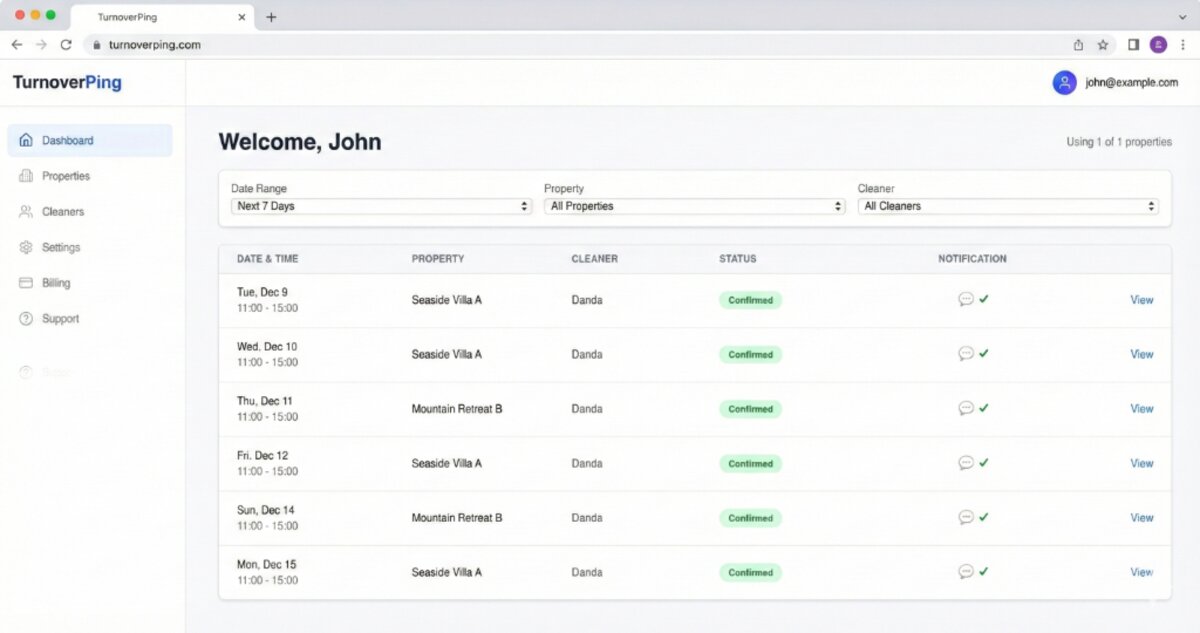
TurnoverPing walks you through each step with a simple dashboard. Most hosts are fully automated in under 60 seconds.
Advanced Automation Features
Once your basic automation is running, explore these power features:
Backup Cleaner Logic
What happens when your primary cleaner can't take a job? Without automation, you'd need to manually find someone else.
With proper backup logic:
- Primary cleaner declines
- System automatically notifies backup cleaner
- If backup also declines, you're alerted to find alternative coverage
- The system prevents "decline loops" where a cleaner who already declined gets notified again
Booking Modification Handling
Guests change their dates. It happens constantly. Automation handles this gracefully:
- Same-day time change: Cleaner gets an update notification
- Date change to a different day: Job is rescheduled, cleaner is notified of the new date
- Cancellation: Job is cancelled, cleaner is notified they no longer need to come
Multi-Property Reporting
Managing many properties? Look for automation tools that provide:
- Dashboard view of all upcoming turnovers
- Job status at a glance (pending, confirmed, completed)
- Historical completion tracking
- Cleaner performance insights
Want a daily digest of all your bookings across Airbnb, VRBO, and Booking.com? RentalReportDaily.com sends you a unified report every morning so you always know what's coming up.
Real-World Automation Scenarios
Here's how automation handles common hosting situations:
Scenario 1: The Back-to-Back Turnover
Guest A checks out at 11am. Guest B checks in at 3pm. You have a 4-hour window. Following a proven turnover cleaning checklist becomes essential.
Without automation: You're texting your cleaner the night before, hoping they confirm, and stressing until the job is done.
With automation: The cleaning job was created and confirmed days ago. Your cleaner shows up at 11am knowing exactly what needs to happen. You don't even think about it.
Scenario 2: The Last-Minute Booking
A guest books for tomorrow. Your calendar just updated.
Without automation: You notice the booking (hopefully), remember to contact your cleaner, hope they're available, and coordinate everything in a panic.
With automation: The system detects the new booking within 30 minutes, creates a job, and notifies your cleaner immediately. You get a notification that a job was created and then another when it's confirmed. Total effort on your part: zero.
Scenario 3: The Cleaner Cancellation
Your regular cleaner gets sick the day before a turnover.
Without automation: You call every cleaner you know, updating them on the property details this specific turnover requires.
With automation: Your cleaner marks the job as declined. The system automatically notifies your backup cleaner with all the details. If they accept, you're covered. If they decline, you get an alert to find alternative coverage. Either way, the system managed the first line of defense without your involvement.
Scenario 4: The Booking Modification
A guest extends their stay by two days.
Without automation: You need to remember to update your cleaner about the new date. Easy to forget when you're managing multiple properties.
With automation: The system detects the calendar change, updates the cleaning job to the new date, and notifies your cleaner of the change. They confirm the new date. Done.
Choosing the Right Automation Tools
Not all automation tools are created equal. Here's what to consider:
For Hosts with 1-20 Properties
You need simplicity. Avoid tools designed for massive property management companies with dozens of features you'll never use.
Look for:
- Quick setup (under 60 seconds)
- Simple interface
- Multi-channel notifications (SMS, WhatsApp, Email)
- Affordable pricing per property
TurnoverPing is built specifically for this segment, offering straightforward automation without enterprise complexity.
For Hosts with 20-50 Properties
You need scalability and visibility. The tool should help you manage many properties without drowning in details.
Look for:
- Dashboard overview of all properties
- Cleaner performance tracking
- Bulk operations
- API access for custom integrations
For Property Managers with 50+ Properties
You likely need a full property management system (PMS) with cleaning automation as one component. These tools offer:
- Team management features
- Advanced reporting
- Custom workflows
- API integrations with other business tools
Start with the simplest tool that solves your current problem. You can always upgrade as your portfolio grows. Overcomplicating early leads to abandoned tools and wasted money.
Creating a Cleaning Checklist to Complement Automation
Automation ensures your cleaner shows up. But how do you ensure they clean to your standards?
That's where checklists come in.
A standardized cleaning checklist ensures every turnover meets your exact standards. It gives cleaners clear instructions, reduces oversight, and leads to consistent 5-star reviews. We've put together a comprehensive guide on what every Airbnb cleaning checklist should include that covers every room and common mistakes to avoid.
Generate Your Free Cleaning Checklist
TurnoverChecklist.com creates customizable cleaning checklists for your vacation rental in seconds. Tailored to your property's unique features.
Pair your automated scheduling with a solid checklist, and you've built a turnover system that runs itself.
Common Automation Mistakes to Avoid
Even with the best tools, hosts make these errors. Make sure you also have a solid cleaning checklist in place to avoid quality issues:
1. Not Testing Before Going Live
Always run test bookings through your system before you depend on it for real turnovers. Catch configuration issues when they don't matter.
2. Ignoring Backup Cleaners
Your primary cleaner will eventually be unavailable. Configure backup cleaners for every property. The few minutes of setup saves hours of panic later.
3. Setting Lead Times Too Long
If you notify cleaners 14 days in advance, bookings will frequently change before the turnover. This creates confusion and extra notifications. For most hosts, 3-7 days is the sweet spot.
4. Over-relying on Automation
Automation handles the routine. But edge cases (property damage, cleaner emergencies, platform glitches) still require human judgment. Stay engaged with your notifications.
Conclusion
You started hosting to earn extra income, not to become a full-time cleaning coordinator. Airbnb cleaning automation gives you back the hours you've been spending on texts, calendar checks, and cleaner follow-ups.
The process is straightforward:
- Export your iCal links from each booking platform
- Set up an automation tool like TurnoverPing
- Add your properties and connect the calendars
- Add your cleaners with their preferred notification channels
- Assign cleaners to properties with backup coverage
- Let the system handle every turnover automatically
From there, you receive confirmations without sending texts. Booking changes are handled without you lifting a finger. Cleaners show up when they're supposed to because the system never forgets.
That's what real automation looks like.
Frequently Asked Questions
How does calendar sync work with Airbnb?
Do my cleaners need to download an app?
What happens if my cleaner doesn't respond?
Can I use automation if I manage properties on multiple platforms?
Is automation worth it for just one or two properties?
Ready to Stop Managing Cleaners Manually?
TurnoverPing automates your cleaning schedule so you can focus on growing your rental business outside of turnover coordination.
Related Articles
How to Organize Linen and Laundry for Multiple Properties
Master the art of linen inventory and laundry logistics across multiple vacation rentals. Learn the 3-set system, professional laundry strategies, and how to keep every property guest-ready without the chaos.

Airbnb Cleaning Checklist for Small Studios and Tiny Spaces
Master the art of cleaning compact vacation rentals. This checklist covers studio apartments, tiny homes, and small spaces where every minute and every square foot counts.

Best Practices for Sharing Calendar Access with Your Cleaners
Discover the safest, most effective ways to share your Airbnb, VRBO, and Booking.com calendars with your cleaning team. Stop micromanaging and start automating.